Submitting
Regardless of how you choose to complete the assignment, you MUST submit the file you worked on to Canvas.
If you’re attending the alternate tutorial (see schedule), please submit your .PY file and make sure your PM has recorded your attendance.
If you’re submitting in-class, make sure to check-in (there will be one question called CHECK-IN Q only available for the first 7 minutes of class) and check-out (there will be a three question survey called CHECKOUT SURVEY only available for the last 10 minutes of class) using PollEverywhere with your location verified.
If you’re submitting out-of-class, make sure to submit your .PY file to be graded. Take extra care to double check you've followed the instructions!
Part 0. Intro
Today, we’ll be combining a number of the concepts we’ve been practicing the last few weeks in order to create a version of a game called Wordle:
- using loops
- reading from files
- validating inputs
- working with dictionaries
You will be creating a Wordle-style game but in text rather than in graphics (spoiler alert: you’ll do some graphics for the Exercise). If you haven’t played Wordle before, your goal is to guess a secret 5-letter word in, at most, 6 guesses. Each time you guess, you’re given some “hints” about about how correct your guess was (screenshot available below):
Wordle Rules Screenshot
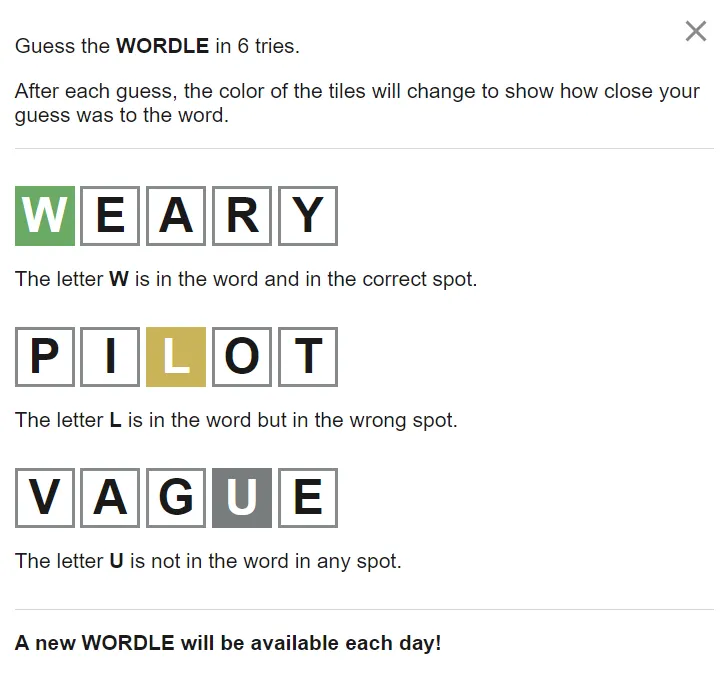
We’ll be building a simpler, text-based version for the Tutorial but then using the same techniques in Exercise 7 to create a super version!
| Tutorial Starter File | Wordle Word List File |
|---|
Note: Depending on your browser, you may need to right click on the wordlist button and select “Download linked file…” or “Save linked file as…”. Make sure to save it as
5_letter_words.txt.
General Approach
Please make the following enhancements to the tutorial6.py file (each marked TODO in the .py file). In addition to the TODOs you’ll find a number of comments helping you perform each task.
PLEASE NOTE: While you only have to write new code in the parts that are marked
TODOintutorial6.py, you’ll need to understand the other code intutorial6.pyin order to know how to edit it to complete the assignment. You can search for theTODOtags using the File menu then “Search” in IDLE. THIS MEANS YOU WILL NEED TO LOOK AT THE EXISTING CODE AROUND THE TODOs to see what is done already and what you'll need to fill-in. DON'T JUST START WRITING CODE. First, understand what's there THEN start editing.
Part 1. Reading in possible words
After the template file, first complete the TODOs in the read_in_words function. This function accepts one input, the path to the file we want to read words from. The template is already setup on line 59 to use this function to on the 5_letter_words.txt file you downloaded and expects it to return a list of 5 letter words from that file.
To do this, you need to:
- Open the file specified by the input argument
- Loop through the file line by line
- Each line of this file is a word along with some associated word-stem information (this is actually a dictionary from the game Scrabble). Open the
5_lettter_words.txtfile in some text editor and you’ll see what I mean. - For Wordle, we only need the very first part of this line, i.e., only the stuff before the first space (
" "). - So split each line by spaces
- Then append the very first element of the list you get back from splitting to the list of words
- There should be 1204 valid words in the file
- Each line of this file is a word along with some associated word-stem information (this is actually a dictionary from the game Scrabble). Open the
- Close the file
- Return the list of words. The template then saves those words into the
GAME_DATAdictionary for you
Once you’re done, try adding some print statements to check the contents (probably don’t print out the entire list…maybe just a few specific words) and size of the list you want to return.
Hints
- To open a file, we use the
open function:open(file_path, "r") - If you have a line of a file stored in a variable called
line , you can split it into a list of separate strings via its spaces by doing:separated_line_list = line.split(" ") . - To close a file named
the_file , we have to use the methodclose :the_file.close()
Part 2. Picking a secret solution
In the middle of the file, look for the "Next pick a solution" section. Complete the TODOs here:
- Use the
choicefunction to pick a random word from the"word_list"key of theGAME_DATAdictionary - Save that random choice inside the
"solution"key of theGAME_DATAdictionary
It might be wise to print out the entry (GAME_DATA["solution"]) after this to both confirm everything is working okay AND just in case you’re bad at Wordle (😉).
Note on using the range Function
While working on the two Wordle assignments, there will often be a time where it might be convenient to use a list of numbers to iterate through each letter of a guess (you can use our square bracket index notations to get specific letters of a string) and compare it to the secret word. Like anything in programming, there are lots of ways to do this. You could for instance, do:
i = 0
while i < 6:
  print(secret_word[i], guess[i])
  i = i + 1 # you can even shorten this by saying i += 1
Alternatively, you can use the range function to emulate the same thing with a for loop:
for i in range(0, 6, 1):
  print(secret_word[i], guess[i])

# which is equivalent to
for i in [0, 1, 2, 3, 4, 5]:
  print(secret_word[i], guess[i])
When only given two inputs, range interprets them as a “from”, “up to”, and a “step size”. That is, range(0, 6, 1) gives us back the list [0, 1, 2, 3, 4, 5].
Both ways are totally fine, so use whatever way is most convenient for you.
Part 3. Generating a hint
Complete the TODOs in the generate_hint function.
- Loop through each letter of the solution and…
- If the letter perfectly matches the solution, you’ll add a
"🟩"to the hint - If the letter is in the solution, but isn’t in the right location, you’ll add a
"🟨"to the hint - Otherwise the letter isn’t in the solution at all, so you’ll add a
"⬜"to the hint
- If the letter perfectly matches the solution, you’ll add a
- return the
hint
Once you’ve completed all of your to-dos, make sure to run your program and see if it works like it should! Note, because we don’t have access to the real Wordle word list, some of your favorite Wordle words might not work. We’ll try to fix this in the Exericse!
Note: If you follow these steps you’ll create a Wordle with a small “double-letter bug” in that the real Wordle gives you information about how many times a letter appears in the solution. You do NOT need to worry about this in either the tutorial or homework this week. If you want to solve it you may–it just involves counting how many times a letter occurs and basing the “hint” off of that information.
Credits
This assignment is obviously inspired by the original Wordle now owned by the New York Times.
The word list we’re using is from the 2023 North American Scrabble Championship which is supported by NASPA.